Everything happening in your community, on every screen in town.
Connecting communities across the state and states across the nation
Residents submit local events in minutes, your team approves them once, and they appear on the public board, the city website, kiosks, and lobby TVs on their own.
- MOBuilding Missouri first
- $0Cost to residents, always
- 24/7Board, displays, and alerts online
Find or post a local event
Browse what is happening near you, or post your own event in about 90 seconds. It is free, and you do not need an account.
Live now
- Missouri statewide board Every connected Missouri city in one place
Want a text when new events drop? Citizen Plus is $7.99 a month.
Run your community's channel
Collect submissions, approve once, and broadcast everywhere from one dashboard, with no developers, servers, or IT burden.
- Board in under 30 minutesLogo, colors, and a permanent web address.
- Every screen includedPublic board, website embed, and lobby TV.
- You approve everythingNothing goes live without your staff.
- Old events clear themselvesThe board stays current on its own.
Not another calendar. A civic broadcast system.
Your community's channel, without hiring a media team. Built for towns where Facebook, paper flyers, and scattered calendars are not enough.
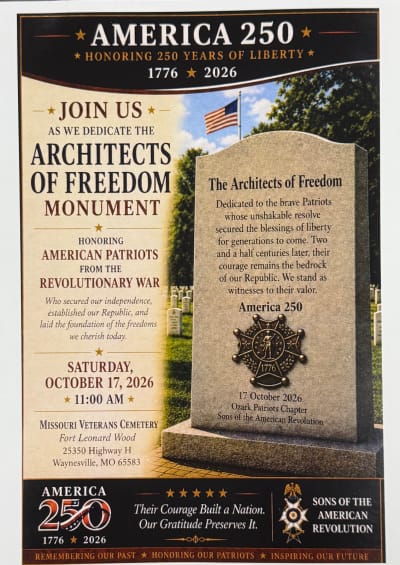
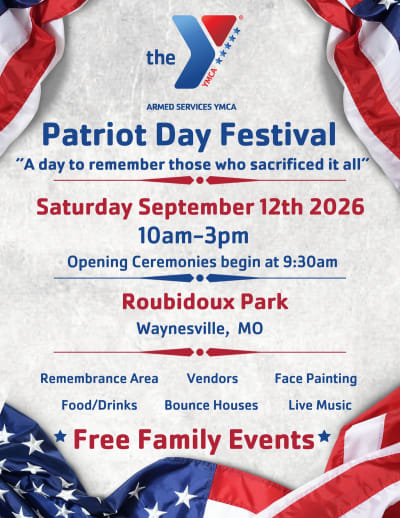
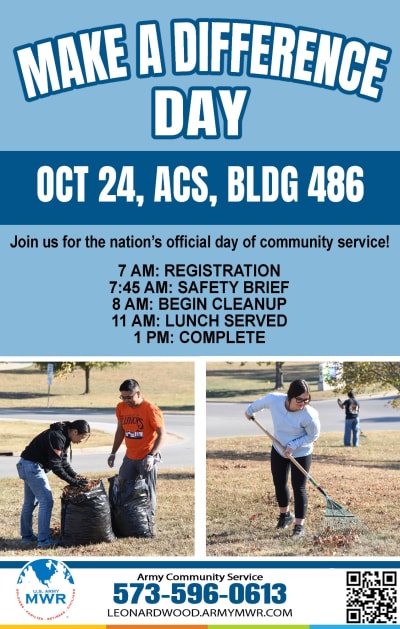
It broadcasts what matters
Events, public service announcements, alerts, and local life reach every screen and resident at once.
One approved feed
Your website, lobby TVs, community centers, radio partners, and residents all pull from the same list.
Submit, approve, done
Residents submit, staff approve, and every screen and page updates without extra work.
From sign-up to city-wide broadcast
There are no developers, servers, or ongoing IT burden, and one approved event is all it takes to go live.
- 1
Set up your board
An administrator creates the account, uploads the city logo, and picks a permanent web address in under 30 minutes.
- 2
Go live
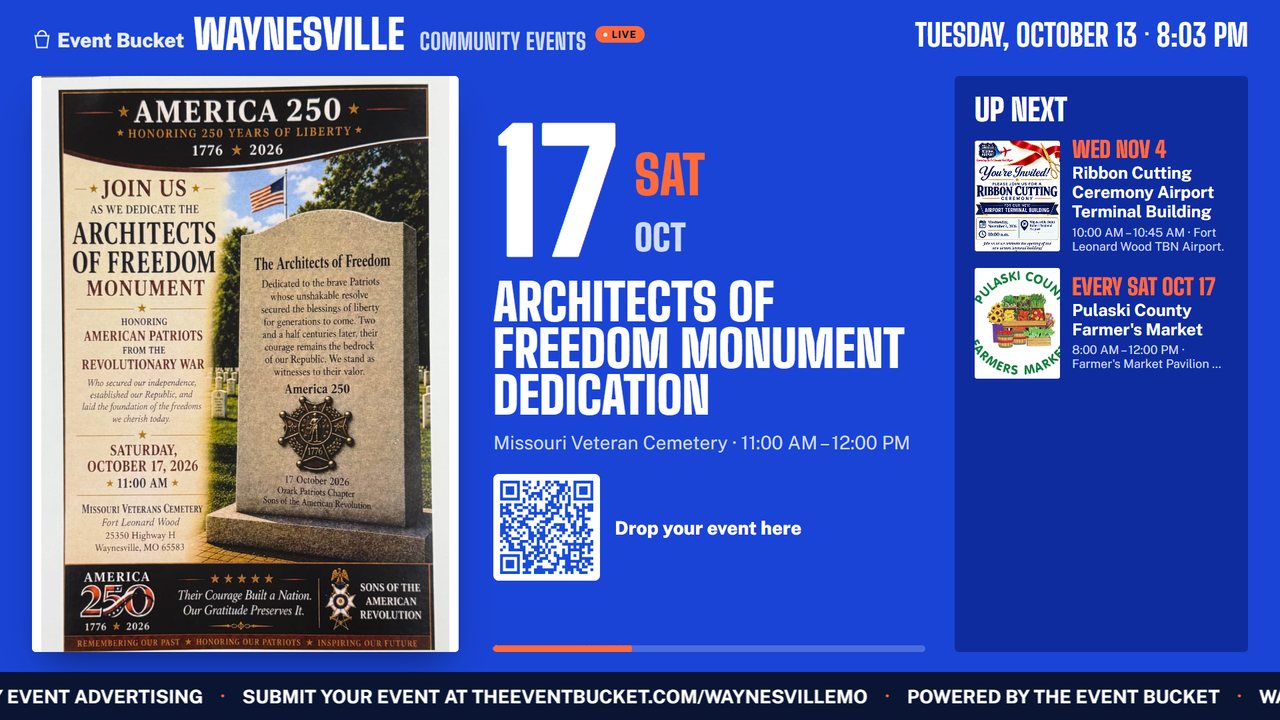
You get a public board, an admin dashboard, a lobby TV display with a queue view, live weather alerts, and a pin on the national map.
- 3
The community submits
Residents and organizers post their own events, and you approve them from the dashboard.
- 4
Every screen stays current
Approved events go to your website, kiosks, and lobby TVs at once, and expired ones clear themselves.
Everything your city needs. Nothing residents pay for.
Full administrative control, free resident access, and every feature included in every city plan, with no add-ons, paywalls, or per-user fees.
Approval before anything goes live
Review every submission, and declined organizers get an email with your reason.
Lobby TV display
Flyers, notices, road closures, and the business of the month on any smart TV or Fire Stick.
Notices and alerts
Boil water notices and emergency updates scroll across every display at once, alongside National Weather Service and FEMA IPAWS alerts.
Business spotlight
Feature a local business each month on the lobby screen.
Reports for council
Analytics and one-click PDF and PowerPoint reports with your city logo.
Audit log
Every approval, edit, and login is timestamped and exportable for records requests.
City-limits check
Submissions are checked against your boundaries, so only your events reach your board.
Embed on your website
Paste a short snippet and the live feed shows on the city site you already have.
One statewide network
Every board connects, so visitors see what is happening in every town along the way, and tourism organizations can join to spotlight their region.
Important: Event Bucket is not a replacement for official emergency notification, 911, sirens, or SMS and phone alert systems. It is a public information display and civic broadcast layer.
See every feature in detail
City administration
- Admin approval panel
- Review, approve, or reject every community-submitted event before it goes live. Rejection emails are sent automatically with your reason, so you keep full control with zero spam.
- Analytics dashboard
- Track submissions, approvals, rejections, and community engagement over monthly, quarterly, and annual periods, with visual charts and one-click exports.
- PDF and PowerPoint reports
- Generate branded reports for council meetings, budget reviews, or stakeholders as clean, presentation-ready documents with your city logo.
- Audit log
- Every approval, rejection, edit, and login is timestamped and logged, and you can export it to CSV or PDF for compliance, FOIA requests, or internal review.
- PSA ticker banners
- Push urgent public service announcements, such as boil water notices, road closures, and emergency updates, that scroll across every display.
- Business spotlight
- Feature a local business each month on the live display rotation to support your local economy and keep the board engaging.
- Custom branding
- Upload your city logo, set your accent color, and get a custom web address such as theeventbucket.com/waynesvillemo.
- Automated email notifications
- Confirmation emails, rejection notices, and edit codes are handled automatically, and submitters get a secure code to update or cancel their own events.
- City-limits verification
- Submissions are checked against your city's boundaries, so only events within your jurisdiction appear on your board.
Live display and TV
- Lobby TV mode
- A full-screen, auto-rotating slideshow for lobby TVs, library screens, and community center displays, where events cycle with flyer images, details, and a Next Up queue.
- FEMA IPAWS and weather alerts
- Automatic alerts from the National Weather Service and FEMA IPAWS, including AMBER, Blue, and Silver Alerts, civil emergency, evacuation, shelter-in-place, and severe weather, with an on-screen banner, audible tones, and text-to-speech that announces the alert type aloud.
- Scheduled video broadcasts
- Schedule council meeting replays, PSA videos, community announcements, and local business features to play at set dates and times or on a continuous rotation, without touching a playout system.
- Auto-rotating slideshow
- Events rotate on a configurable timer, with the featured event in full detail and upcoming events in a sidebar queue.
- PSA ticker overlay
- Important announcements scroll across the bottom of the display, independent of the slideshow, with priority tiers for emergencies and routine notices.
- Captive-audience programming
- Turn the TVs in city hall, the rec center, the library, and the senior center into a community channel, so every minute a resident spends waiting is a minute your city informs them.
- Auto-expiring events
- Past events disappear automatically after their end date, so the board always shows what is current and upcoming.
Resident experience
- Free event submissions
- Any resident, nonprofit, or organization can submit events for free with no account, upload a flyer, and the city reviews it.
- Filter by date range
- Pull up this week, next month, or any custom date range to find exactly what you need.
- Browse by category
- Community, Music, Sports, Family, Faith, Food, Arts, Education, Business, Church, Yard Sale, Festival, Concert, Fundraiser, and Volunteer Opportunities, plus keyword search.
- Volunteer opportunities
- One central place to find volunteer needs across your region, posted by the organization and browsed by neighbors who want to help, always free.
- Yard sales and community sales
- Every yard sale, estate sale, moving sale, and craft fair in one place, with a map view, a date filter, and a printable list.
- Print and export
- Generate a clean, print-ready event list or export to CSV for church bulletins, newsletters, and senior center postings.
- Self-service event edits
- Submitters receive a secure edit code by email to update dates, change venues, or request cancellation without contacting city staff.
- No account required
- Browse events, watch the live display, filter, print, and export without signing up or giving away personal data.
Integrations
- Website embed widget
- Drop a single line of code into your city website for a live, auto-updating event feed that blends with your design, with light and dark themes detected automatically.
- Auto-theme detection
- The embed widget reads your website's background color and switches between light and dark modes with no configuration.
- National partner map
- Every participating city appears on the Event Bucket network map, so residents can discover events in any partner city.
- Radio partner integration
- Local radio stations can use your city's event feed to read live on air, a free partnership that extends your reach. Learn about radio partners.
- Mobile-responsive design
- The community board, admin panel, submission form, and embed widget work on phones, tablets, laptops, and lobby TVs.
- Shareable city web address
- Every city gets a permanent link, such as theeventbucket.com/yourcity, to share on social media, in newsletters, or on printed materials.
Why cities choose Event Bucket over Facebook and website calendars
- Official approval before anything goes live
- No algorithm deciding who sees local information
- No account required for residents
- Events expire automatically, so the board stays clean
- Lobby TV mode for public buildings
- Embeddable feed for your existing website
- Printable and exportable event lists
- One source of truth for residents, staff, partners, and local media
One statewide network for visitors and tourism
- Every local event in one place
- Every city on Event Bucket broadcasts its own events, and every board is connected, so a visitor traveling the state can open one platform and see what is happening in every community along the way. Tourism organizations join the same network to spotlight their region, turning dozens of separate calendars into a single front door for the whole state.
Cities pay. Residents use it free.
City pricing is based on population, so small towns are not priced like large cities, and residents never pay a thing.
City plans
The full civic broadcast platform, priced by population from U.S. Census data, so small towns are not priced like large cities. Enter your city and state to see exactly what your city pays, with no sales call.
Every city plan includes the full platform.
Community plan
For churches, nonprofits, schools, civic groups, and businesses that want their own community channel.
That is $948 a year, billed monthly, and you can cancel anytime.
What the community plan includes
- Community event board with your organization name
- Up to 15 events at a time
- TV display mode for lobbies, waiting rooms, and storefronts
- Events auto-expire when done
- Public event submissions from your community
- No weather or AMBER alerts
- No Business Spotlight
- No admin approval workflows
- No custom branding or analytics
- No PSA banners or video broadcasts
Residents
Browsing and posting events is free, with no account needed, because your city pays for the platform.
What residents get free
- Live event display with a Next Up queue
- Real-time NWS severe weather alerts on the display
- City alerts and PSA notices
- Public video broadcasts
- Browse events by category
- Filter by week, month, or date range
- Search events by keyword
- Print and export event listings
- Works on any device or TV screen
- No account or login required
- Submit events to your city's board
The Community Plan is designed for organizations and businesses, not municipalities, so a city or county government looking for alerts, analytics, and city branding should use the city price lookup above. Local radio stations can join free as radio partners.
Bring The Event Bucket to your city
Your community board can be live in as little as 10 minutes, and all you need is one event to start.
Want to see it first? In a 10-minute demo we will show how a resident submits an event, how your staff approve it, and how it appears on your public board, website embed, and lobby TV on its own. Have a question instead? Reach us through contact and support.